
Auto-Publish Blog Posts Everywhere with Blogie AI
 Blogie
Introduction: One post, everywhere—automatically
If you’ve ever finished a solid post and then felt your energy disappear the moment you thought about re-posting it everywhere else… you’re not alone. Writing is already the hard part. But the “after” work—copy/paste into Medium, tweak formatting for LinkedIn, grab the right image, add tags, add a canonical link, schedule it, repeat—turns one great idea into a messy checklist.
This is exactly where being able to publish blog posts to multiple platforms automatically changes your output. You stop treating distribution like an extra project and start treating it like a default. And if you’re building consistency (for SEO, inbound leads, or audience growth), consistency only happens when the workflow is easy enough to repeat weekly.
Why manual cross-posting kills consistency
Manual cross-posting is deceptively expensive: it steals 30–90 minutes per post just in formatting, uploading images, and re-checking links. When that time adds up over a month, most people “temporarily pause” distribution and the pause becomes permanent. The result is sporadic visibility and slow compounding growth.
It also creates hidden friction. Each platform has different quirks—headline length, image rules, tag limits, and editor behavior—so you end up re-learning the same lessons every time. That friction becomes the reason your best content never reaches the channels where your audience actually hangs out.
What “automatic publishing” really means
Automatic publishing means you write once, then a system pushes the right version of that post to the right destinations with minimal clicks—often using schedules, templates, and pre-set rules. In practice, it’s a combination of: a source of truth (your main blog), a distribution hub (like Blogie), and integrations (RSS, APIs, or automation tools).
It doesn’t mean “spray and pray.” The best setups still respect platform norms—like adding a canonical URL on Medium or adjusting hooks for LinkedIn—while keeping the process fast and repeatable.
What you’ll set up in the next 30 minutes
By the end of this guide, you’ll have a practical plan to publish blog posts to multiple platforms automatically using Blogie AI as the hub. You’ll set a primary blog destination, choose 2–4 secondary channels, and build a simple rule set for titles, tags, excerpts, and tracking links.
You’ll also learn the pitfalls that break automation (like revoked tokens or broken embeds), plus the SEO realities of syndication vs republishing. The goal is speed without chaos—so you can scale output this week, not “someday.”
Authority & basics: autopublishing vs syndication vs republishing
Before you try to publish blog posts to multiple platforms automatically, you want to be clear on what you’re actually doing. People often use autopublishing, syndication, and republishing interchangeably, but the differences matter—especially for SEO and tracking what’s working.
Definitions and SEO implications
Autopublishing is the workflow: a tool takes content from one place and posts it elsewhere with little manual work. Syndication is the strategy: you distribute the same content (full or partial) on other platforms to reach new audiences. Republishing is the act: you repost the content (often full-text) under the same author/brand elsewhere.
SEO-wise, syndication can be neutral or positive when you handle canonical links and attribution correctly. Republishing full posts without a canonical strategy can create duplicate versions competing in search, which can dilute visibility and confuse indexing.
Canonical URLs and duplicate content realities
A canonical URL is a “source of truth” signal telling search engines which version of a page should be treated as the primary. When you syndicate full posts to platforms like Medium, you typically want the canonical to point back to your original post so your main site gets the SEO credit.
Duplicate content penalties are often misunderstood—Google usually chooses one version to show rather than “punishing” you—but you can still lose traffic if the wrong version becomes the one that ranks. That’s why smart autopublishing includes canonical handling, excerpt strategies, or “first publish then syndicate later” timing.
When to syndicate excerpts vs full posts
Excerpts work best when the platform is mainly a discovery channel (LinkedIn feed, email preview, some communities) and you want clicks back to your main site. Full posts work best when the platform rewards on-platform engagement (Medium reads, Dev.to community signals) and you can safely set canonical or add clear attribution.
If you’re unsure, start with a hybrid: publish an optimized excerpt plus 1–2 key sections, then link to the full post. Tool roundups like 9 Best Tools To Auto Publish are useful for seeing what automation options exist, but your best choice depends on your SEO priorities and how much formatting control you need.
What Blogie AI does: the autopublish workflow in plain English
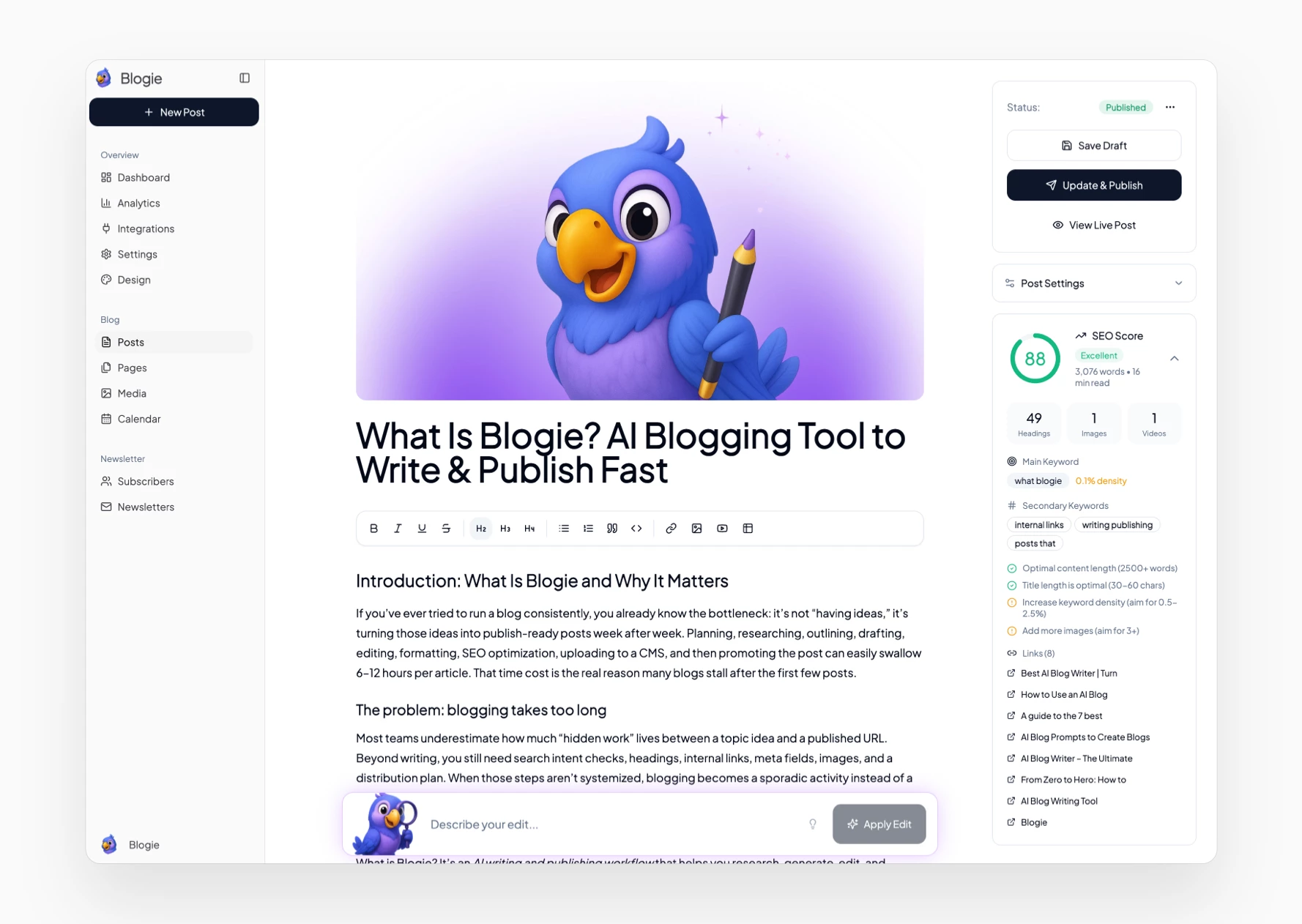
Blogie is designed to remove the “tool juggling” that makes content teams slow. Instead of writing in one place, editing in another, scheduling somewhere else, and distributing with a patchwork of automations, Blogie AI can act as the hub where drafting, optimizing, and distribution connect cleanly.
That’s the core promise behind Blogie AI autopublishing: fewer steps between “idea” and “published everywhere.” If your goal is to publish blog posts to multiple platforms automatically, you need a workflow that’s not fragile—and not dependent on 15 browser tabs.
Content creation to distribution pipeline
The pipeline is straightforward: you define what you want to write, Blogie helps generate an SEO-ready draft, you refine it in a clean editor, then you publish or schedule it. What makes it different is that publishing doesn’t have to mean “only on one site.” You can treat Blogie as the place where the final version lives, then push out versions to other channels.
This matters because the final mile—distribution—is where most content strategies quietly fail. A consistent pipeline means you can build an actual cadence (like 2 posts per week) and keep distribution attached to every post by default, not only when you “have time.”
Where integrations fit (API/RSS/Zapier/Make)
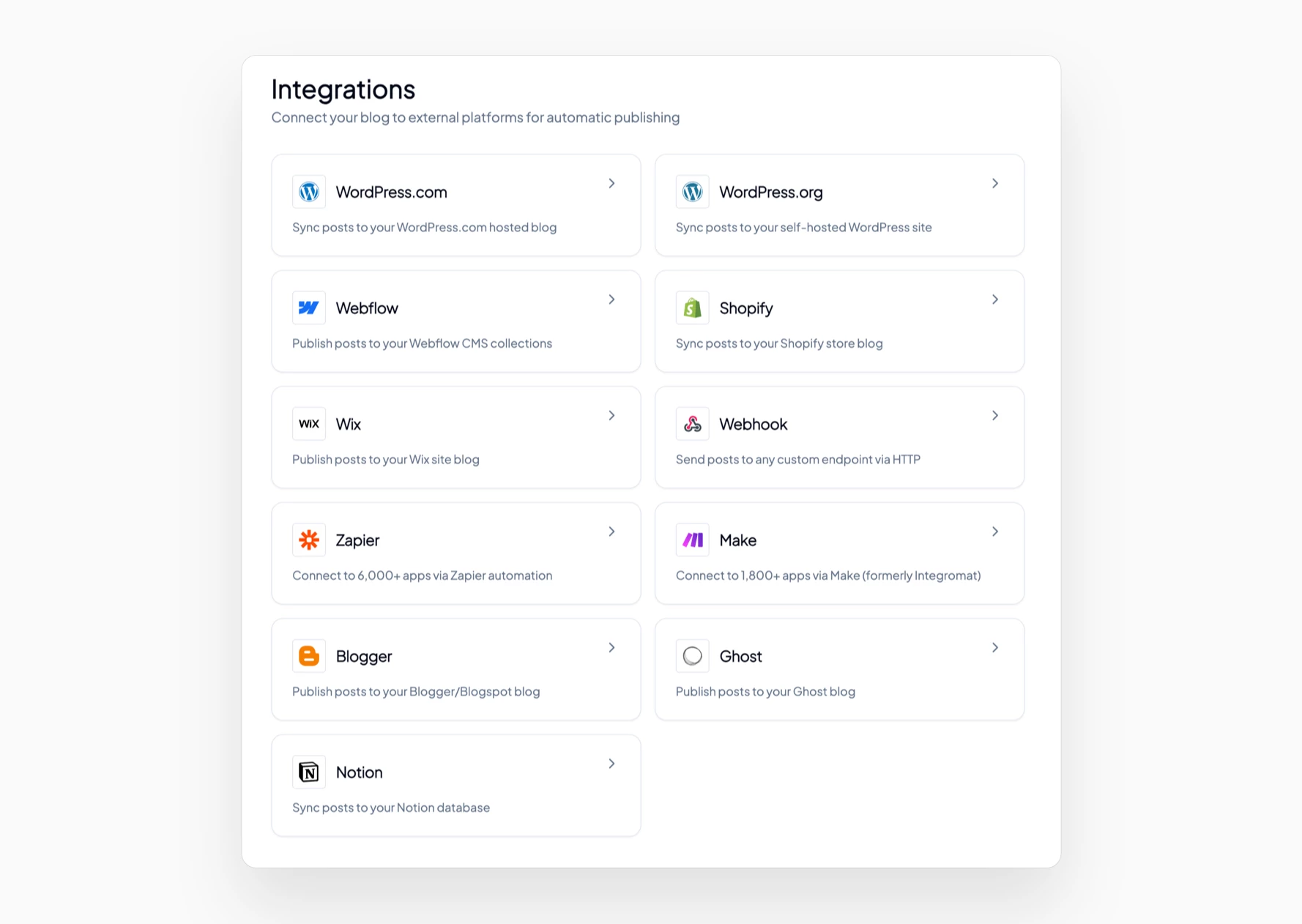
There are a few ways to connect systems when you publish blog posts to multiple platforms automatically: direct platform APIs, RSS feeds that trigger actions, or automation tools like Zapier/Make acting as glue. Blogie fits cleanly into all of these styles depending on what you’re connecting and how customized you want each destination to be.
For example, you might use RSS to trigger a LinkedIn post, then use a scheduler for social amplification. Tools like Buffer: Social media management for everyone can pair well with Blogie by handling promotion while Blogie handles the actual publishing pipeline.
Supported destinations you should prioritize first
Don’t start by trying to publish to 12 places. The best approach is to pick one “home” (your blog on blogie.ai or your custom domain) and 2–3 channels that match your audience: Medium for discovery, LinkedIn for professional reach, Dev.to for developer content, and Substack for email-first distribution.
Once those are stable, expand into secondary distribution like Twitter/X threads, Reddit community posts, or curated newsletters. The goal is a reliable base where you can publish blog posts to multiple platforms automatically without constantly debugging formatting issues.
Set up Blogie AI for multi-platform publishing (step-by-step)
This is the practical part: you’re going to build a repeatable workflow that lets you publish blog posts to multiple platforms automatically without rewriting your process every time. Think “set it once, then reuse it for every post.” Even if you improve it later, the first version should be simple and stable.
If you’re brand new to Blogie, start by creating your blog on blogie.ai. You can publish on a free subdomain in minutes, then connect a custom domain when you’re ready.
Connect your primary blog (WordPress/Webflow/Shopify CMS)
Step one is picking your “source of truth.” For many teams, that’s a Blogie-hosted blog or a connected domain; for others, it’s WordPress or Webflow as the main site, with Blogie used for writing and distribution. The key is deciding where the canonical version of each post lives, because that impacts SEO and analytics.
If your main site is WordPress/Webflow/Shopify CMS, you’ll want to confirm your slug structure, image handling, and metadata fields (title, description, OG image). Once those are consistent, your automation becomes predictable, which is essential when you publish blog posts to multiple platforms automatically at scale.
Create publishing templates (titles, tags, UTMs)
Create a template for each destination so you’re not reinventing formatting. Your template should include: title rules (full title vs shortened), excerpt rules (first 280–400 characters or a custom summary), tag mapping (your SEO keyword tags to platform tags), and a default attribution line that links back to your main post.
For tracking, add UTM parameters to links you expect people to click (especially the “Read the full post” link). If you want inspiration for how teams design a dependable automation pipeline, How to Build a Content Publishing gives a solid overview of workflow thinking—even if you keep your own setup simpler inside Blogie.
Enable schedules, queues, and approval rules
Scheduling is where the magic really becomes “automatic.” Instead of publishing immediately, set a queue: your main blog publishes first, then secondary platforms publish 24–72 hours later (often better for canonical/SEO clarity). This also keeps your audience from seeing the same post everywhere in the same hour.
If you have a team, add lightweight approvals: one person checks the SEO title/meta, another checks links and brand voice. A simple approval rule prevents the most common autopublishing mistakes—like broken links or missing images—while still letting you publish blog posts to multiple platforms automatically without slowing down.
Platform-by-platform recipes (Medium, LinkedIn, Dev.to, Substack)
Different platforms reward different behavior. The goal isn’t to dump identical content everywhere; it’s to create small, repeatable variations that still let you publish blog posts to multiple platforms automatically without turning it into a manual rewrite project.
Below are practical “recipes” you can use as defaults, then refine after you’ve shipped your first 10 posts. If you want to compare how other tools think about automation features, Auto Publish is a useful reference point—but your best workflow is the one you’ll actually maintain.
Medium: import vs API posting and canonical settings
Medium gives you two common paths: importing a post (which can automatically set the canonical to your original URL) or posting via an integration/API workflow. For most brands, importing is the safest start because it reduces duplicate-content risk and keeps attribution clean.
Your default recipe: publish on your main Blogie site first, wait 48 hours, import to Medium, confirm canonical points back to your original. If you’re aiming to publish blog posts to multiple platforms automatically and keep SEO tidy, this “delay + canonical check” habit pays off fast.
LinkedIn: newsletter/article formatting and hooks
LinkedIn is hook-driven. Your first 2–3 lines matter more than perfect formatting, so your automation template should include a custom opening: a bold claim, a quick stat, or a “here’s the mistake I see” line. Then add a short table-of-contents style list to increase scroll depth.
Decide whether you’re publishing as an article or a newsletter post. Newsletters can create recurring subscribers, while articles can be easier to share broadly; either way, keep paragraphs short and include one clear CTA link with UTMs so you can measure results when you publish blog posts to multiple platforms automatically.
Dev.to/Substack: tags, excerpts, and email-first tweaks
Dev.to rewards relevant tags and a helpful, practical tone. Use 3–4 tags max, keep code blocks clean, and add a short “Why this matters” section near the top. For cross-posting blog content to Dev.to, consider publishing full text with canonical attribution, especially if your post is technical and benefits from comments.
Substack is email-first, so your template should prioritize a strong subject line and a short intro that feels personal. Include a condensed version of the post with the key takeaways, then link to the full version on your blog. This approach keeps Substack subscribers happy while still letting you publish blog posts to multiple platforms automatically and drive steady site traffic.
Comparisons: Blogie AI vs Zapier vs Make vs native schedulers
When people say they want to publish blog posts to multiple platforms automatically, what they often mean is: “I want this to work without babysitting it.” So let’s compare the common approaches—because the best tool depends on how much control you need and how much time you’re willing to spend maintaining the system.
Speed and reliability tradeoffs
Native schedulers (inside each platform) are reliable but slow to operate because you still have to log in everywhere. Zapier and Make can be fast to deploy, but reliability depends on how many steps you chain together and whether a platform changes its API behavior. Blogie’s advantage is consolidation: fewer moving parts between writing and publishing means fewer silent failures.
If your main pain is “I can’t keep up,” then centralizing your workflow in Blogie and using integrations only where needed is usually the fastest path to publish blog posts to multiple platforms automatically without creating a brittle automation maze.
Formatting control and image handling
Formatting is where most automations break. RSS-based posting can strip images, collapse spacing, or remove custom embeds—especially when a destination expects specific HTML/markdown rules. Make/Zapier can add formatting steps, but each transformation is another failure point to monitor.
Blogie’s cleaner editor and publishing-centric approach reduces how often you have to “fix the post after it publishes.” That matters if your posts are image-heavy, include tables, or require consistent metadata for SEO when you publish blog posts to multiple platforms automatically.
Cost, maintenance, and failure recovery
Cost isn’t just subscription price. Zapier/Make can become expensive when you trigger multi-step workflows for every post, especially with retries and formatting steps. Native schedulers are “free,” but your time becomes the cost—plus errors from manual repetition.
Blogie sits in a middle ground: you’re paying for an integrated workflow that reduces maintenance. If you also need AI-assisted drafting, optimization, and publishing in one place, using a writing tool like AI blog writer - Generate SEO plus separate distribution automations can work—but it often increases tool sprawl compared to a single hub approach.
SEO + analytics: avoid duplicate issues and measure what works
If you’re going to publish blog posts to multiple platforms automatically, you need two guardrails: (1) protect your search visibility and (2) track what’s actually driving leads, signups, and subscribers. Otherwise, autopublishing becomes “activity” without measurable outcomes.
The good news: a simple content syndication strategy can be SEO-safe and analytics-friendly if you apply a few consistent rules.
Canonical strategy and noindex decisions
Start by deciding where the canonical version lives—ideally your own domain or your Blogie-hosted blog. When you republish full posts on Medium or Dev.to, use canonical URLs when the platform supports it, and add a clear attribution line near the top linking back to your original.
For platforms that don’t support canonical well, consider excerpt-only syndication or a delayed republish schedule. In some cases, you may prefer to publish an adapted version that’s meaningfully different, which reduces duplication concerns while still letting you publish blog posts to multiple platforms automatically as part of your workflow.
UTM tagging and link attribution
UTMs are non-negotiable if you want to know what’s working. Your default should be: utm_source=(platform), utm_medium=syndication (or social), utm_campaign=(post slug or topic cluster). Add UTMs to the primary CTA link back to your site, and keep the format consistent so reporting doesn’t turn into a cleanup project.
This is especially important when you cross-posting blog content, because a post can “feel successful” on one platform while actually generating fewer site visits or signups than a smaller-looking post elsewhere.
Tracking conversions across platforms
Decide on one or two primary conversion events (newsletter signup, trial start, demo request) and track them in your analytics stack. Then create a simple reporting view: conversions by utm_source and by landing page. Once you’ve done that, you can prioritize the platforms that actually move your business forward.
If you’re evaluating automation tools in general, lists like Best Automated Content Creation Software can spark ideas. But measurement is what turns autopublishing from “more posts” into “more pipeline,” especially when you publish blog posts to multiple platforms automatically every week.
Common mistakes that break autopublishing (and fixes)
Automation is amazing when it works—and incredibly annoying when it fails quietly. If you want to publish blog posts to multiple platforms automatically without surprises, it helps to know the common breakpoints and build small safety checks into your workflow.
Most issues fall into three buckets: formatting/media problems, strategy problems (posting too much), and integration failures.
Broken embeds, images, and slug mismatches
Broken embeds usually happen when a platform strips scripts or iframes, or when RSS doesn’t carry the embed code cleanly. The fix is to standardize your post components: prefer static images over complex embeds for syndicated versions, and keep a “platform-safe” block you can swap in automatically.
Slug mismatches happen when one platform auto-generates a different URL structure than your main blog, which can confuse tracking and attribution. Fix this by controlling the title/slug where possible and always linking back to the original post with a consistent UTM format when you publish blog posts to multiple platforms automatically.
Over-posting and audience fatigue
Autopublishing makes it easy to post too often, too widely, too quickly—especially if you push full posts to every platform on the same day. Audience fatigue shows up as lower engagement, unsubscribes, and weaker distribution over time. The fix is to stagger releases and vary the format: full post on your blog, excerpt on LinkedIn, a threaded summary later, then a newsletter version.
A simple rule: don’t let automation remove judgment. Your content syndication strategy should still respect how each platform’s audience prefers to consume information, even as you publish blog posts to multiple platforms automatically.
Automation failures: rate limits, revoked tokens, drafts stuck
APIs have rate limits, and tokens get revoked when passwords change or admins leave a company. When that happens, posts can get stuck in draft mode or fail entirely with no obvious alert. The fix is to add a weekly “distribution audit” checklist: confirm last post published everywhere, verify links, and check for drafts queued unexpectedly.
If you’re building larger AI-driven workflows that include repurposing steps, AI Workflows for Content Repurposing: From is a useful read for thinking about workflow design. The goal is resilience: your system should fail loudly and be easy to recover, so you can keep your ability to publish blog posts to multiple platforms automatically without constant monitoring.
Real-world scenarios: workflows for different creators and teams
“Best workflow” depends on who’s publishing and why. A solo creator wants speed. A startup team wants control and brand consistency. An agency needs governance across clients. Below are realistic setups that make it easier to publish blog posts to multiple platforms automatically while keeping the process sane.
Solo creator: weekly longform to 4 channels
Your simplest high-leverage workflow is: publish the main post on your Blogie blog, then syndicate to Medium, post an adapted intro on LinkedIn, and send a Substack version to your email list. Keep it consistent: same publish day every week, and stagger the secondary platforms by 1–3 days so each channel feels fresh.
To keep things organized, maintain one “distribution checklist” doc with your template snippets and UTM rules. You’ll be surprised how quickly you can publish blog posts to multiple platforms automatically when you stop deciding from scratch each time and just follow the system.
Startup marketing team: approvals + brand voice
A team workflow needs approvals without bottlenecks. Use Blogie as the writing and editing hub, with a lightweight approval rule: one person approves SEO elements (title/meta, internal links), and another approves brand voice (tone, claims, product positioning). After approval, the post schedules automatically to your blog and then to secondary channels.
To keep brand voice consistent, build a small “voice guide” and reuse it for prompts and edits. Also, use Explore to review examples and patterns you like, then standardize them so you can publish blog posts to multiple platforms automatically without sounding different on every channel.
Agency: multi-client governance and permissions
Agencies should separate “content creation” from “publishing credentials.” The safest model is: writers draft and edit in Blogie, strategists approve, and client-specific integrations are managed by an admin account with clear permissions. That way, a contractor leaving doesn’t break your entire pipeline.
For reporting, agencies should standardize UTM conventions across clients (and document them). This makes it much easier to prove results from your ability to publish blog posts to multiple platforms automatically, because attribution stays clean across dozens of channels and landing pages.
Call to action: launch your first Blogie AI autopublish pipeline today
If you’ve read this far, you don’t need more theory—you need a first working version. Your goal is a minimum setup that lets you publish blog posts to multiple platforms automatically this week, then refine it based on what breaks (and what performs).
Minimum viable setup checklist
Start with the basics: set up your blog on blogie.ai, publish one post, and define your “source of truth” URL. Then create one distribution template that includes an excerpt, a canonical/attribution line, and a tracked link back to the original.
Keep your first version boring on purpose. Boring means stable, and stable means you’ll actually keep using it to publish blog posts to multiple platforms automatically.
Best first platforms to add this week
Pick two platforms where your audience already is. For most SaaS founders and marketers, that’s LinkedIn plus Medium; for developers, LinkedIn plus Dev.to; for creators, Substack plus Medium. Add only what you can maintain, because consistency beats complexity every time.
Once those two are steady, add a third channel and refine formatting so each destination feels native while still letting you publish blog posts to multiple platforms automatically.
How to iterate after the first 10 posts
After 10 posts, review analytics by platform (using UTMs) and decide what to double down on. Keep what drives conversions, pause what doesn’t, and adjust templates based on engagement signals like read time, clicks, and replies.
That’s how autopublishing becomes a growth engine: you use a consistent system, then improve the system—rather than rebuilding it every week.
FAQ: automatic multi-platform publishing with Blogie AI
This section answers the questions people ask right before they commit to an autopublishing workflow. The goal is to help you publish blog posts to multiple platforms automatically with confidence—without accidentally creating SEO problems or fragile automations.
Will this hurt SEO or rankings?
It can hurt SEO if you republish full posts everywhere with no canonical strategy and no timing plan, because search engines might rank the “wrong” copy. The safer approach is: publish on your main site first, then syndicate later with canonical URLs where supported, and use excerpts where canonical support is weak.
In practice, many sites successfully publish blog posts to multiple platforms automatically without SEO damage by treating their main blog as the source of truth and using other platforms as distribution layers. If you want extra caution, start with excerpt syndication and expand to full posts once you’ve confirmed canonical behavior on your main channels.
Can I customize formatting per platform?
Yes—and you should, at least lightly. A good automation system supports templates so LinkedIn gets shorter paragraphs and a stronger hook, Medium gets a clean import/canonical flow, and Substack gets an email-friendly intro plus clear section breaks. You’re not rewriting the post; you’re applying a repeatable “skin” per platform.
This is the sweet spot where you still publish blog posts to multiple platforms automatically but avoid the “obviously cross-posted” look. Over time, you can add more advanced variations like different CTAs, different lead paragraphs, or a bonus section for email subscribers.
What happens if a platform API fails?
Failures happen for predictable reasons: expired tokens, permission changes, rate limits, or a platform changing how it accepts content. Your workflow should assume this will happen eventually and include two protections: (1) alerts or a weekly audit that checks distribution, and (2) a retry/manual fallback so you can publish quickly if automation stalls.
The most important mindset shift is this: don’t abandon automation because of one failure—harden it. Once you’ve fixed the weak point, you get back to the main benefit: you can publish blog posts to multiple platforms automatically and keep your content cadence consistent even when your schedule gets busy.
Want to put this into action? Start your workflow on blogie.ai, then explore how other posts are structured for distribution-friendly formatting inside blog. The faster you ship your first automated pipeline, the faster your content starts compounding.
Internal links used:
This article was created using Blogie.
This article was created using Blogie.