
Start a Blog Without Hosting or Plugins Using Blogie AI
 Blogie
Introduction: Launch a Blog Today Without Setup
If you’ve ever tried to start a blog and immediately got hit with decisions like “Which host?”, “Which theme?”, “Which plugins?”, “Why is my site slow?”, you’re not alone. A lot of people don’t quit because they can’t write—they quit because the setup feels like a second job. This guide is for anyone who wants to start a blog without hosting and actually publish something today, not “someday when the tech is sorted.”
What “no hosting, no plugins” really means
When people say they want to start a blog without hosting, they’re usually saying: “I don’t want to buy a hosting plan, install WordPress, configure plugins, or troubleshoot updates.” With a managed platform like Blogie AI, the publishing environment is already there, so you focus on writing and posting instead of infrastructure.
“No plugins” also means you’re not stitching together SEO tools, editors, image compressors, and email add-ons. Instead, you get a single workflow where writing, editing, publishing, and distribution happen in one place, which is a huge deal if you want a blog without technical setup.
Who this approach is best for (and who it isn’t)
This approach is best for creators, founders, marketers, and busy professionals who want to publish a blog fast and stay consistent. If you want to validate an idea, build authority in a niche, or support a product with content, a no hosting blog platform removes the friction that usually kills momentum.
It’s not ideal if your project requires deep server-level customization, complex membership rules, or heavy plugin ecosystems. If you already love maintaining a WordPress stack and optimizing every technical detail, you may prefer DIY—but most people just want to write and grow.
What you’ll have live by the end of this guide
By the end, you’ll know how to start a blog without hosting using Blogie AI, publish your first post, set basic branding, and create a simple content plan you can realistically maintain. You’ll also have a repeatable workflow—so the second, third, and tenth post take less effort than the first.
And yes, you’ll do it without buying hosting, installing themes, or playing plugin roulette.
Why Blogging Without Hosting Is Exploding (And Why It Works)
Traditional blogging advice often starts with a long checklist: register a domain, buy hosting, install a CMS, pick a theme, add plugins, configure caching, connect analytics, set up email, and then—finally—write. That’s why so many blogs never make it past “Hello World.” The shift toward platforms that let you start a blog without hosting is happening because people want publishing to feel like publishing, not like IT.
Lower cost, faster publishing, fewer points of failure
The simplest reason this is growing: you can start a blog without hosting and skip monthly hosting bills, paid themes, and plugin subscriptions that quietly pile up. When your tools are consolidated, you’re also less likely to break something during an update or conflict two plugins that don’t play nicely together.
Speed matters, too. If you can publish a blog fast, you can test ideas, get feedback, and improve without waiting weeks to “launch.” For beginners and small teams, fewer moving parts usually means more consistency.
The hidden time tax of traditional CMS setups
Even if you follow a solid guide like How to Start a Blog in, a DIY setup has a time tax: theme tweaks, mobile formatting issues, plugin settings, backups, and security warnings. None of those tasks directly help you become a better writer or get more readers.
That time tax gets worse if you’re not technical, because every “small” issue becomes a research project. A blog without technical setup is basically a way to reclaim those hours and spend them on content and promotion instead.
When managed publishing beats DIY infrastructure
Managed publishing wins when your goal is output: publishing weekly, building topical authority, and creating a library of search-friendly posts. If your growth strategy is SEO + consistency, the best system is the one you’ll actually use, not the one with the most customization options.
For many creators, choosing a no hosting blog platform is less about “cutting corners” and more about building a durable habit. If you want to start a blog without hosting and keep publishing for the next 90 days, managed tools often beat DIY.
What Blogie AI Is and How It Removes Technical Barriers
Blogie AI is an AI-powered blogging platform built for people who want to write and publish without juggling a messy stack of tools. Instead of piecing together hosting, WordPress, plugins, and separate AI tools, Blogie combines research, writing, editing, publishing, scheduling, and distribution into one workflow. If your goal is to start a blog without hosting, this is the type of platform designed specifically for that.
AI-assisted writing + built-in publishing workflow
Blogie works like an AI blog generator, but the key difference is that it’s not “generate a blob of text and good luck.” You describe what you want to write, and the platform helps with keywords, competitor context, and structure—then you refine in a clean editor and publish from the same place.
This matters because writing is only half the job. When your draft, edits, images, SEO fields, scheduling, and publishing controls live together, you can publish a blog fast without bouncing between five tools and losing momentum.
How Blogie AI replaces hosting, themes, and plugins
With self-hosted blogging, you’re responsible for the server (hosting), the presentation (theme), and the functionality (plugins). Blogie takes a different route: it provides a managed environment where the platform handles the “site” part, so you can start a blog without hosting and still have a professional-looking result.
Instead of hunting for plugins for SEO, editorial workflows, email notifications, or scheduling, you use built-in features. That’s the whole point of a no hosting blog platform: fewer dependencies, fewer breakdowns, and fewer surprise maintenance days.
Key limitations to know before you start
Any managed platform comes with tradeoffs. If you want endless theme customization or very specific plugin-based functionality, a self-hosted path (like the one described in How To Start A Self Hosted) may give you more control—but you’ll pay for that control time and upkeep.
For most people who want a blog without technical setup, these limitations aren’t deal-breakers because the goal is publishing and growth. The smartest move is to choose the platform that matches what you’ll realistically do every week: write, edit, publish, and promote.
Step-by-Step: Start a Blog Without Hosting Using Blogie AI
If you’re ready to start a blog without hosting and stop overthinking the tech, this is your simple, practical path. The goal here isn’t perfection—it’s getting your first post live, quickly, with a setup you can repeat.
Create your blog, choose a niche, set your goal
First, create your blog in Blogie AI and pick a niche that’s specific enough to build authority. “Fitness” is broad; “strength training for desk workers” is more focused and easier to plan around. Your niche should connect to something you can write about for 30+ posts without running out of steam.
Next, define one clear goal: traffic, subscribers, leads, or credibility. A lot of beginners follow generic advice from places like How to Start a Blog in, but your goal is what tells you what to publish and how to measure progress.
Generate your first post and edit for your voice
Use Blogie as your AI blog generator to produce a first draft with a clear topic and reader outcome. Give it context like your audience, your preferred tone, and what you want the reader to do at the end (subscribe, click, buy, or just understand).
Then edit for voice: add your opinion, personal examples, and specific steps. If you want to start a blog without hosting and still build trust, you can’t sound like a generic template—your edits are what make the post feel human and credible.
Publish and set basic blog settings (title, URL, layout)
Before publishing, tighten your title and URL so they match the keyword and are easy to read. For example, if your post is about the primary keyword, keep it straightforward: “How to Start a Blog Without Hosting (Simple Setup).” Small clarity improvements can increase clicks and reduce bounce.
Finally, publish and check formatting on mobile. One of the underrated benefits of using a no hosting blog platform is that you’re not troubleshooting theme issues—your time goes into content quality and consistency.
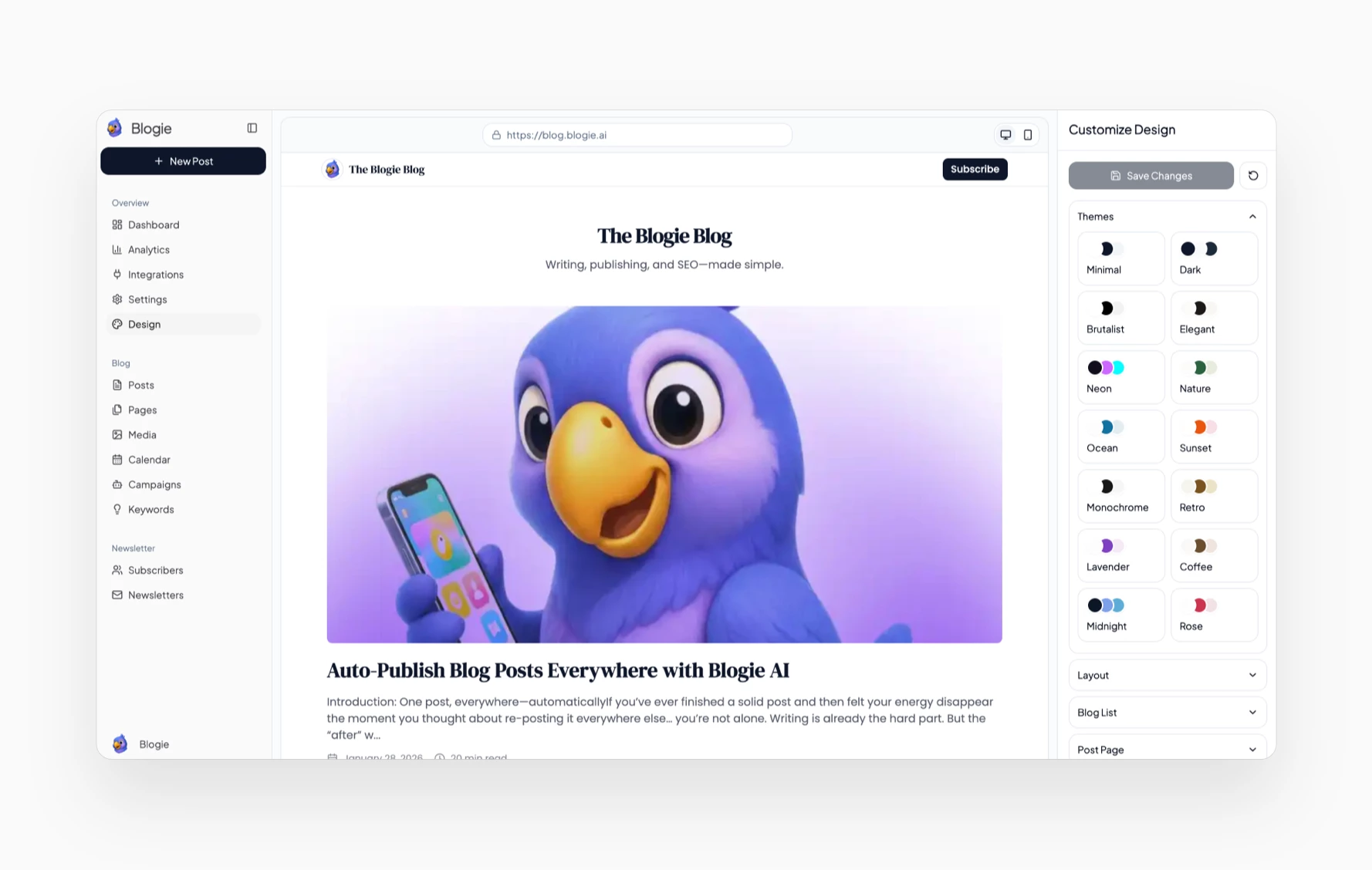
Set Up Your Blog’s Brand in 30 Minutes (No Design Skills)
Branding sounds like something you do “later,” but a few simple choices early on will make your blog feel intentional and trustworthy. The goal isn’t to create a massive brand guide—it’s to make your content recognizable and consistent. This is especially helpful when you start a blog without hosting, because the platform handles the technical side and you can focus on how your blog feels to readers.
Pick a name, tagline, and content angle
Choose a name that’s easy to spell, easy to say, and clearly aligned with your niche. Pair it with a tagline that tells readers what they’ll get, like “Short, practical SEO guides for solo founders.” Your content angle is the twist that differentiates you from bigger sites covering the same topic.
If you’re building on Blogie AI, your name and angle also guide the prompts you’ll give the AI. The clearer your positioning, the easier it is to publish a blog fast without rewriting everything from scratch.
Create a simple visual identity (logo, colors, header image)
You don’t need fancy design software. Pick two main colors, one accent color, and one clean font style you’ll use everywhere—your blog header, images, and social graphics. Consistency beats complexity, especially in the first 30 days.
It’s worth remembering that developers have built entire experiences with minimal infrastructure (see Create a Blogging Platform With No), and that same principle applies here: keep it lightweight so you can ship content repeatedly.
Build core pages: About, Contact, Privacy Policy
Your blog should have a simple About page that answers: who you are, who the blog is for, and what readers should do next. A Contact page can be as basic as an email form or a business email address, especially if you’re open to partnerships or client work.
Add a Privacy Policy early—especially if you use analytics, email signups, or affiliate links. When you start a blog without hosting, you still need the same trust basics as any other site, and these pages are part of that foundation.
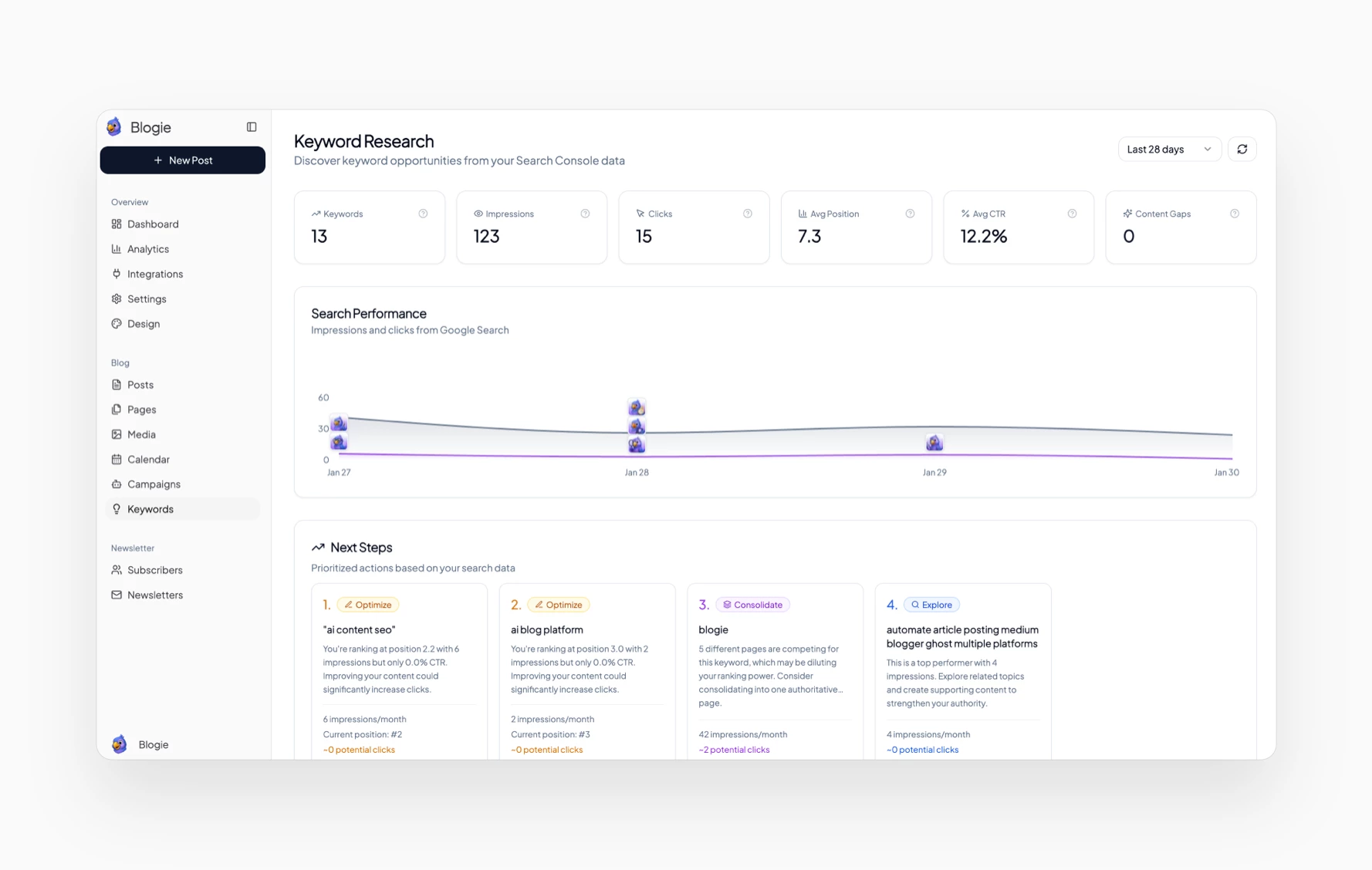
Content Strategy Without the Guesswork: Topics, Keywords, and Cadence
If you want a blog that grows, your strategy needs to be boring in the best way: consistent topics, consistent publishing, and consistent quality. You don’t need an MBA-level content plan—you need a plan you’ll actually follow. A blog without technical setup helps because your energy goes into content, not configuration, making it easier to start a blog without hosting and stay active.
Choose content pillars and map 20 starter topics
Start with 3–5 content pillars—buckets you’ll publish within for the next 90 days. For example, a marketing blog might use pillars like SEO basics, email marketing, landing pages, and case studies. Pillars keep your blog focused, which helps both readers and search engines understand what you’re about.
Then map 20 starter topics by listing beginner questions, “how-to” posts, comparisons, and templates. If you’re using Blogie AI as an AI blog generator, you can generate clusters quickly—just make sure each topic has a clear reader outcome and doesn’t overlap too heavily with the last post.
Basic keyword research without paid tools
You don’t need expensive SEO software to get started. Use Google autocomplete, “People also ask,” and related searches to find phrasing real humans use. Your goal is to find keywords with clear intent, like “how to do X” or “X vs Y,” not vague one-word terms.
For more structured guidance, resources like How to start a blog: the can help you understand the basics, but the main rule is simple: write the post that best answers the query. If you consistently start a blog without hosting and publish helpful posts, you build topical authority over time.
Create a realistic publishing schedule you can maintain
Pick a cadence that matches your life, not your ambition. For most beginners, 1 post per week is strong—4 posts per month is enough to learn, improve, and build a real archive in 6 months. If you can do 2 per week without burning out, that’s great, but consistency beats intensity.
Use scheduling so you can write in batches and publish automatically. That’s one of the biggest wins of a no hosting blog platform: you can focus on output and let the system handle timing and distribution.
Blogie AI Workflow: From Idea to Publish (Repeatable System)
The biggest advantage of using Blogie isn’t just that you can start a blog without hosting—it’s that you can create a workflow you repeat every week without friction. When your workflow is repeatable, your blog becomes a system, not a project you “get back to” occasionally. That’s how small blogs become big ones.
Prompt templates for outlines, drafts, and rewrites
Create a few reusable prompt templates so you’re not reinventing the wheel every time you publish. For example: “Create an outline for a beginner-friendly post targeting [keyword], include steps, mistakes, and a checklist.” Then a draft prompt: “Write in a friendly tone, short paragraphs, add examples, and include a CTA for [goal].”
This approach turns an AI blog generator into a real editorial assistant. The result is faster output and a more consistent style, which is essential if you want to publish a blog fast without sacrificing quality.
Editing checklist: clarity, accuracy, and originality
Before you publish, run a simple editing checklist: tighten the intro, add subheadings, remove fluff, and make each section actionable. Then fact-check any claims, stats, or tool recommendations—especially if the topic involves finance, health, or legal guidance. Accuracy is how you earn trust, and trust is how you earn repeat readers.
Also add originality: one personal example, one “here’s what I’d do” opinion, or one real template. Platforms like Create Your Blog With The Best show how common blog setups can be—your uniqueness comes from your perspective and your practical details.
Batch production: write 4 posts in one sitting
Batching is the easiest way to stay consistent. Set aside one block of time (like Saturday morning) to outline four posts, then draft them with Blogie, then edit one per week. Even if you only batch outlines, you’ll publish faster because your “what should I write?” question is already answered.
When you start a blog without hosting, you remove the tech overhead—batching removes the mental overhead. Combine both, and you’ll be surprised how quickly your blog archive grows.
Comparison: Blogie AI vs WordPress vs Medium vs Substack
Choosing a platform is basically choosing tradeoffs. Do you want maximum control, or maximum convenience? Do you want to monetize with ads, build an email list, rank on Google, or build a personal portfolio? If you want to start a blog without hosting, you’re prioritizing speed and simplicity—but it still helps to see how the major options compare.
Control vs convenience: what you gain and give up
WordPress (self-hosted) offers the most control: plugins, themes, custom code, and advanced SEO tooling. The downside is you’re responsible for maintenance, security, backups, and performance, which is the opposite of a blog without technical setup. Medium and Substack are convenient, but you’re often building on someone else’s ecosystem and design constraints.
Blogie leans into convenience while still being purpose-built for blogging output. If your priority is to start a blog without hosting and run an efficient writing-to-publishing workflow, Blogie is closer to “do the work that matters” than “configure the stack.”
Costs: hosting, themes, plugins, email, and maintenance
Costs aren’t just dollars—they’re hours. WordPress can be inexpensive monthly, but paid themes, plugin bundles, developer help, and performance tools can add up quickly. Medium and Substack are cheap to start, but they may take a cut (directly or indirectly) and limit site-level flexibility.
With a no hosting blog platform, you’re typically paying to avoid the hidden maintenance and setup costs. If your goal is to publish a blog fast and keep publishing, that trade is often worth it.
Best choice by goal: SEO, newsletter, portfolio, monetization
For pure SEO control and custom technical optimization, WordPress is still the heavyweight—if you’re willing to manage it. For a built-in audience and social-style discovery, Medium can work well, but it’s less of an owned-asset approach. For newsletters and email-first publishing, Substack is strong, especially if your content is personality-driven.
Blogie fits best when your goal is a consistent, SEO-friendly content engine with minimal friction. If you want to start a blog without hosting and still build a real content library you control and grow, Blogie’s all-in-one workflow is a practical middle path.
Platform | Setup Difficulty | Best For | Main Tradeoff |
|---|---|---|---|
Blogie AI | Low | Fast publishing + SEO-ready workflow | Less deep customization than self-hosted |
WordPress (Self-hosted) | High | Maximum control + plugins | Maintenance, security, performance burden |
Medium | Very Low | Built-in readership + simplicity | Less ownership/control of platform |
Substack | Low | Newsletter-first publishing | Website flexibility + ecosystem dependence |
Common Mistakes When Starting a No-Hosting Blog (Avoid These)
When you start a blog without hosting, you eliminate a lot of problems—but you can still sabotage your results with a few common mistakes. The good news is these are easy to avoid once you know what to look for. Think of this section as your “save yourself three months” checklist.
Publishing AI drafts without fact-checking or voice edits
An AI blog generator can give you an excellent draft, but you still own the final content. If you publish without fact-checking, you risk sharing outdated advice, incorrect definitions, or made-up details that can hurt trust. Add sources when relevant and remove anything you can’t confidently verify.
Voice edits matter just as much. Readers can tell when content is generic; your job is to add examples, preferences, and real-world steps so your post sounds like you, not a template.
Choosing a niche that’s too broad to rank or grow
Broad niches create broad content, and broad content usually struggles to rank because you’re competing with massive sites. Instead of “personal finance,” choose “personal finance for freelancers” or “budgeting for new parents.” You want a niche where you can answer specific questions better than generalist websites.
This also helps you publish a blog fast because your content ideas become obvious. When your niche is clear, you stop staring at a blank page and start building a library.
Ignoring legal basics: privacy, disclosures, and citations
Even if you start a blog without hosting, you still need to treat your blog like a real publication. Add a Privacy Policy if you collect emails or use analytics, and add affiliate disclosures if you use affiliate links. If you cite stats, studies, or quotes, link to the original source whenever possible.
This isn’t about being overly formal—it’s about credibility. Simple legal pages and clean citations reduce risk and make your blog feel professional from day one.
Real-World Scenarios: Which Path Should You Choose?
“Best platform” depends on your constraints: time, budget, patience for tech, and what you’re trying to build. Below are common scenarios and the path that usually makes the most sense—especially if you want to start a blog without hosting and keep the process simple.
Creator building authority fast with minimal time
If you’re a creator with limited hours, your main bottleneck is output. You need a workflow that helps you draft, edit, schedule, and publish consistently without messing with plugins, themes, or site maintenance. That’s where a blog without technical setup shines, because it turns your limited time into published assets.
In this scenario, using Blogie AI to start a blog without hosting is a straightforward choice: you can focus on authority-building posts, content clusters, and subscriber growth instead of setup tasks.
Small business needing content without a web team
Small businesses often need blog content for SEO, product education, and lead generation, but they don’t have a developer on call. A DIY setup can become fragile if nobody owns updates, security, and performance. A managed platform reduces operational risk while still letting you publish regularly.
If you want to publish a blog fast to support a service business, SaaS, or local company, Blogie’s all-in-one flow can help you go from “we should blog” to “we have 12 posts live” without hiring extra help.
Student/professional building a portfolio and credibility
If you’re building a portfolio—writing samples, thought leadership, or project breakdowns—you want something clean, easy to maintain, and quick to update. The content matters more than the tech stack, and you need something you can keep running through school, job changes, and busy seasons.
In that case, it makes sense to start a blog without hosting and treat your blog like a living resume. A consistent archive of thoughtful posts often does more for credibility than a perfectly customized theme you never update.
Call to Action: Publish Your First Blog Post With Blogie AI Today
If you’ve read this far, you’re not looking for more theory—you’re looking for a simple way to publish. The fastest way to build a blog is to ship the first post, then improve from there. If you want to start a blog without hosting and avoid the usual setup spiral, Blogie is built for exactly that workflow.
Minimum viable blog checklist (30–60 minutes)
Here’s your quick checklist: create your blog on blogie.ai, choose a niche, write an About page, and publish one helpful post. Pick a simple title, a clear URL, and make sure your post has scannable headings and a short conclusion. That’s enough to be “live” and legitimate.
Don’t wait to have the perfect logo or the perfect category structure. When you start a blog without hosting, you can iterate quickly, and iteration beats perfection every single time.
Your first 7-day publishing plan
Day 1: publish your first “starter” post that answers a beginner question in your niche. Day 3: publish a second post that’s a checklist, template, or “common mistakes” guide. Day 6 or 7: publish a comparison post (“X vs Y”) or a “best tools for” post if it fits your audience.
This gives you three posts quickly, which helps your blog feel real and gives you enough content to share on social or send to friends. If you can publish a blog fast in week one, you’ll build momentum that’s hard to lose.
How to measure success: traffic, subscribers, leads
Pick one primary metric for the first month. If you’re focused on SEO, watch impressions and clicks over time (it’s normal for SEO to start slow). If you’re focused on audience, track email subscribers. If you’re building a business, track leads: contact form submissions, demo requests, or replies.
The key is consistency: if you start a blog without hosting and publish weekly for 12 weeks, you’ll have enough data to improve intelligently instead of guessing.
FAQ: Starting a Blog Without Hosting, Plugins, or Setup
When people decide to start a blog without hosting, they usually have the same practical questions: domains, SEO, and monetization. Here are clear answers so you can move forward confidently without getting stuck in research mode.
Can I use my own domain without hosting?
Yes—many managed platforms allow you to connect a custom domain without you personally buying a hosting plan and managing a server. You’re essentially pointing your domain to the platform, which then serves your blog content. That’s the easiest way to get a professional URL while keeping the blog without technical setup advantage.
If you’re starting quickly, you can begin on a free subdomain and connect your domain later. This approach lets you publish a blog fast and upgrade branding when you’re ready.
Will Google rank a blog built without WordPress?
Yes—Google ranks pages based on relevance, quality, and usability, not whether you used WordPress. WordPress can be helpful because of its ecosystem, but it’s not a ranking requirement. What matters most is publishing useful content that matches search intent and building topical authority over time.
If you use Blogie AI to start a blog without hosting, focus on clear keyword targeting, strong internal linking between related posts, and consistent publishing. Those fundamentals matter more than the CMS logo.
How do I monetize a no-hosting blog?
You can monetize in the same ways as any other blog: affiliate marketing, selling digital products, services, sponsorships, or driving leads to a business. Start with one monetization method that fits your niche and audience. For example, service providers often monetize fastest by using blog posts as “proof of expertise” that converts readers into inquiries.
The main rule: don’t rush monetization before you have content depth. If you start a blog without hosting and publish 20–30 high-quality posts, monetization options become easier because you have traffic, trust, and clear audience needs.
Quick internal resources:
Blogie AI platform overview for an all-in-one writing and publishing workflow.
Start publishing on Blogie if your priority is to launch without setup.
Explore Blogie AI features like scheduling, distribution, and editing.
If your main goal is to start a blog without hosting and finally stop getting stuck in setup, the simplest next step is: create your blog, publish one post, and commit to one post per week for the next month using Blogie AI.
This article was created using Blogie.
This article was created using Blogie.