
What Is Blogie? AI Blogging Tool to Write & Publish Fast
 Blogie
Introduction: What Is Blogie and Why It Matters
If you’ve ever tried to run a blog consistently, you already know the bottleneck: it’s not “having ideas,” it’s turning those ideas into publish-ready posts week after week. Planning, researching, outlining, drafting, editing, formatting, SEO optimization, uploading to a CMS, and then promoting the post can easily swallow 6–12 hours per article. That time cost is the real reason many blogs stall after the first few posts.
The problem: blogging takes too long
Most teams underestimate how much “hidden work” lives between a topic idea and a published URL. Beyond writing, you still need search intent checks, headings, internal links, meta fields, images, and a distribution plan. When those steps aren’t systemized, blogging becomes a sporadic activity instead of a predictable growth channel.
What Blogie does in one sentence
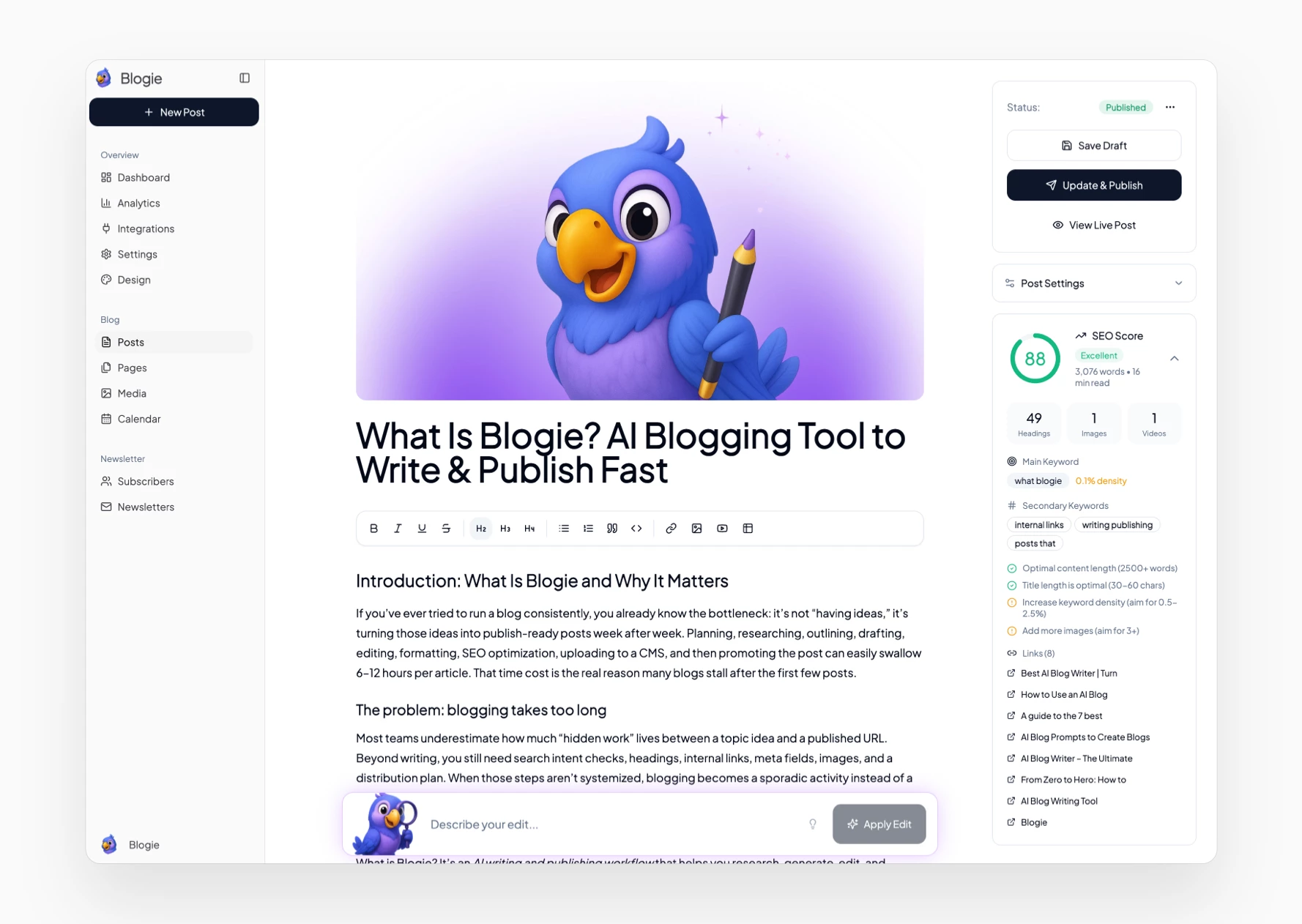
What is Blogie? It’s an AI writing and publishing workflow that helps you research, generate, edit, and publish SEO-focused blog posts quickly—often from a single prompt—so content gets shipped on schedule. Instead of stitching together multiple tools, Blogie aims to keep drafting, optimization, and publishing in one place.
Who it’s built for (creators, marketers, founders)
What is Blogie most useful for? People who need output and consistency: creators building an audience, marketers responsible for pipeline, and founders doing founder-led marketing. It’s also helpful for lean teams that want an AI blogging platform to standardize content production without hiring a full editorial department.
Try Blogging with Blogie AI
If you’re looking for a streamlined way to create and manage your blog, look no further than Blogie AI. This innovative platform empowers you to write, publish, and distribute engaging blog posts without the usual distractions or complexities that often accompany traditional blogging methods. With Blogie, you can focus on what truly matters: delivering high-quality content to your audience.
Getting started is incredibly simple. Visit www.blogie.ai to explore the intuitive features designed specifically for bloggers. Whether you're a seasoned writer or just dipping your toes into the blogging waters, Blogie provides the tools necessary for crafting compelling narratives that resonate with readers.
Don’t let the challenges of blogging hold you back. Try Blogie today and experience the power of AI-assisted writing that makes your publishing process faster and more efficient. Join the growing community of bloggers who are already leveraging this cutting-edge technology to elevate their content creation and engage their audience like never before.
How Blogie Works (From Prompt to Published Post)
At a practical level, what is Blogie doing differently from a typical document-based AI tool? It’s designed around the lifecycle of a blog post: you start with an input, the system helps you gather context, you generate a draft with structure, then you push it live (or schedule it) with fewer handoffs. That “start-to-finish” flow matters because most delays happen in transitions between tools.
Describe your topic: inputs that get best results
The output quality depends on the clarity of your inputs, so Blogie works best when you provide: a target reader, a specific outcome, and 3–5 talking points you want covered. Add constraints like word count ranges, tone (e.g., practical, opinionated, technical), and any must-include product details. If you’re comparing tools, list the competitors you want referenced and the criteria that matter.
AI research: keywords and competitor context
Rather than writing in a vacuum, an AI blog post generator becomes more useful when it understands the SERP context you’re trying to compete in. Blogie’s workflow emphasizes pulling in topic/keyword direction and competitor-style patterns so your draft isn’t just fluent—it’s positioned. If you’re evaluating the broader category, it can help to compare approaches like Best AI Blog Writer | Turn to see how different tools handle “research + draft + publish” as a single process.
Generate, edit, then publish or schedule
Once the outline and research direction are set, Blogie generates the article with headings, sections, and formatting that’s closer to publish-ready HTML than a raw blob of text. You then edit: tighten intros, add examples, insert internal links, and confirm claims. Finally, you either publish immediately or schedule it so your content calendar stays consistent without last-minute uploading.
Core Writing Features: Human-Sounding, SEO-Ready Drafts
What is Blogie as a writing engine? It’s an assistant that helps you move from idea to a readable post with a structure that maps to SEO needs: clear H2s/H3s, scannable paragraphs, and keyword-aware headings. The goal isn’t “let AI write anything it wants,” but to produce a strong first draft that’s easy to shape into your voice.
Outline + full-article generation
Blogie typically starts by proposing an outline that matches the topic’s likely search intent and reader questions. You can accept it, reorder sections, or add missing angles before generating the full post. That outline-first step reduces rewrites because you’re approving the structure before the system expands it into a full article.
Tone, structure, and readability controls
Good blog content is easy to scan, so Blogie focuses on short paragraphs, clear subheadings, and purposeful lists where they help comprehension. Tone controls let you steer the draft toward “expert but friendly,” “minimal and direct,” or “narrative and example-heavy,” depending on your audience. If you’re building a repeatable process, treat this as your in-tool style guide.
Editing tools: expand, rewrite, improve sections
The biggest time saver is targeted editing: instead of regenerating the whole post, you can expand a single section, rewrite a paragraph to reduce fluff, or improve clarity in a dense explanation. That’s a hallmark of a practical SEO content writing tool: it helps you iterate fast without breaking the structure. For additional guidance on using AI for blog drafts responsibly, How to Use an AI Blog offers a useful framework you can apply alongside Blogie’s editor.
SEO Research Inside Blogie: Keywords, Intent, and Competitors
Publishing faster only helps if the posts can actually earn visibility. That’s why what is Blogie can’t just be “writing software”—it has to support the SEO decisions that happen before you draft. Topic choice, intent alignment, and competitor differentiation are what separate posts that rank from posts that disappear after a brief spike.
Finding topics that can rank
Blogie’s SEO research workflow is about selecting topics where your site has a realistic chance to compete, not just chasing the biggest keywords. You look for long-tail phrases, underserved questions, and clusters you can build around a core theme. This approach works especially well for newer sites that need incremental wins rather than one “hero keyword” that takes a year to crack.
Aligning content to search intent
Search intent is the difference between writing “a nice article” and writing the article Google is willing to show. Blogie’s process should push you to decide whether the query is informational, commercial, or transactional, and then mirror the expected format—definitions, steps, comparisons, or templates. When you match intent, your bounce rate tends to drop and time on page tends to rise.
Competitor-aware angles and coverage gaps
Competitor awareness isn’t about copying headings—it’s about finding what competitors missed and answering it clearly. You can identify gaps like missing examples, weak “how to” steps, outdated screenshots, or no comparison table. If you want broader context on how AI tools approach blog generation and SERP research, A guide to the 7 best can help you benchmark what “good” looks like across the category.
Publishing and Scheduling: Get Posts Live Without Tech Headaches
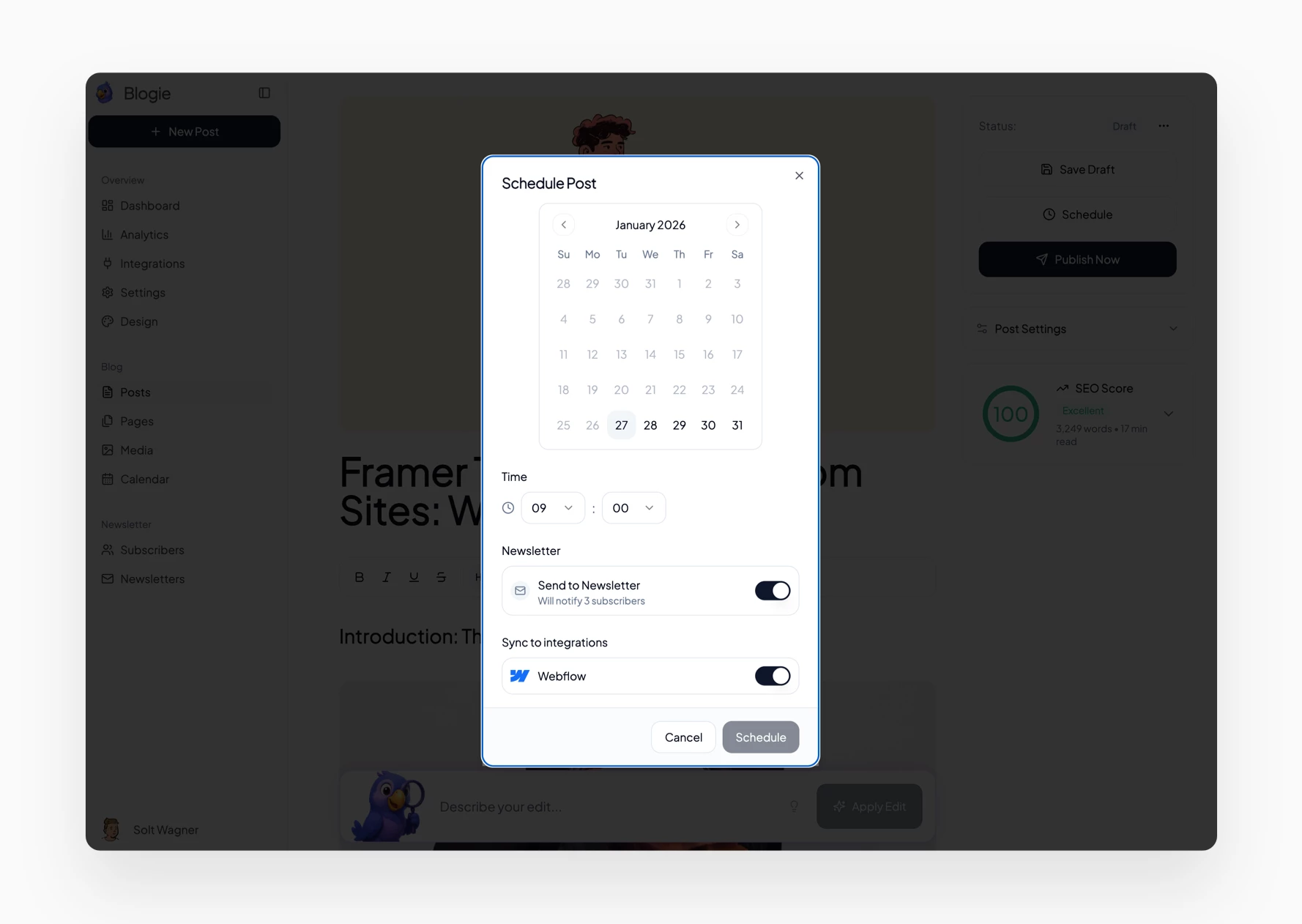
For many teams, the slowest part of content production is not writing—it’s publishing. Formatting gets broken, meta titles are forgotten, featured images don’t fit, and someone has to log into a CMS to fix it all. What is Blogie aiming to solve here? A more direct path from “approved draft” to “live post,” with scheduling and basic multi-channel support built in.
One-click publishing workflow
A streamlined publishing flow typically includes: title, slug, meta description, headings, and clean formatting that doesn’t collapse when pasted into a CMS. Blogie’s promise is reducing the copy/paste and “fix the spacing” chores that steal an extra hour per post. The more repeatable your formatting is, the easier it becomes to delegate reviews and approvals.
Scheduling and content calendar habits
Scheduling is how you turn blogging from a bursty project into a durable system. A simple habit is to draft 2–4 posts in batches, then schedule them weekly so your site stays active even during busy weeks. When your schedule is consistent, you also get cleaner analytics because traffic patterns aren’t distorted by long publishing gaps.
Multi-platform publishing basics
If your strategy includes syndication or cross-posting, Blogie can support the idea of publish blog to multiple platforms without rebuilding the post from scratch each time. The key is keeping one canonical version (usually on your main domain) and repurposing snippets or modified versions elsewhere. For prompt ideas that speed up drafts while keeping quality controls, AI Blog Prompts to Create Blogs can complement Blogie’s workflow.
Integrations: Publish Anywhere, From One Place
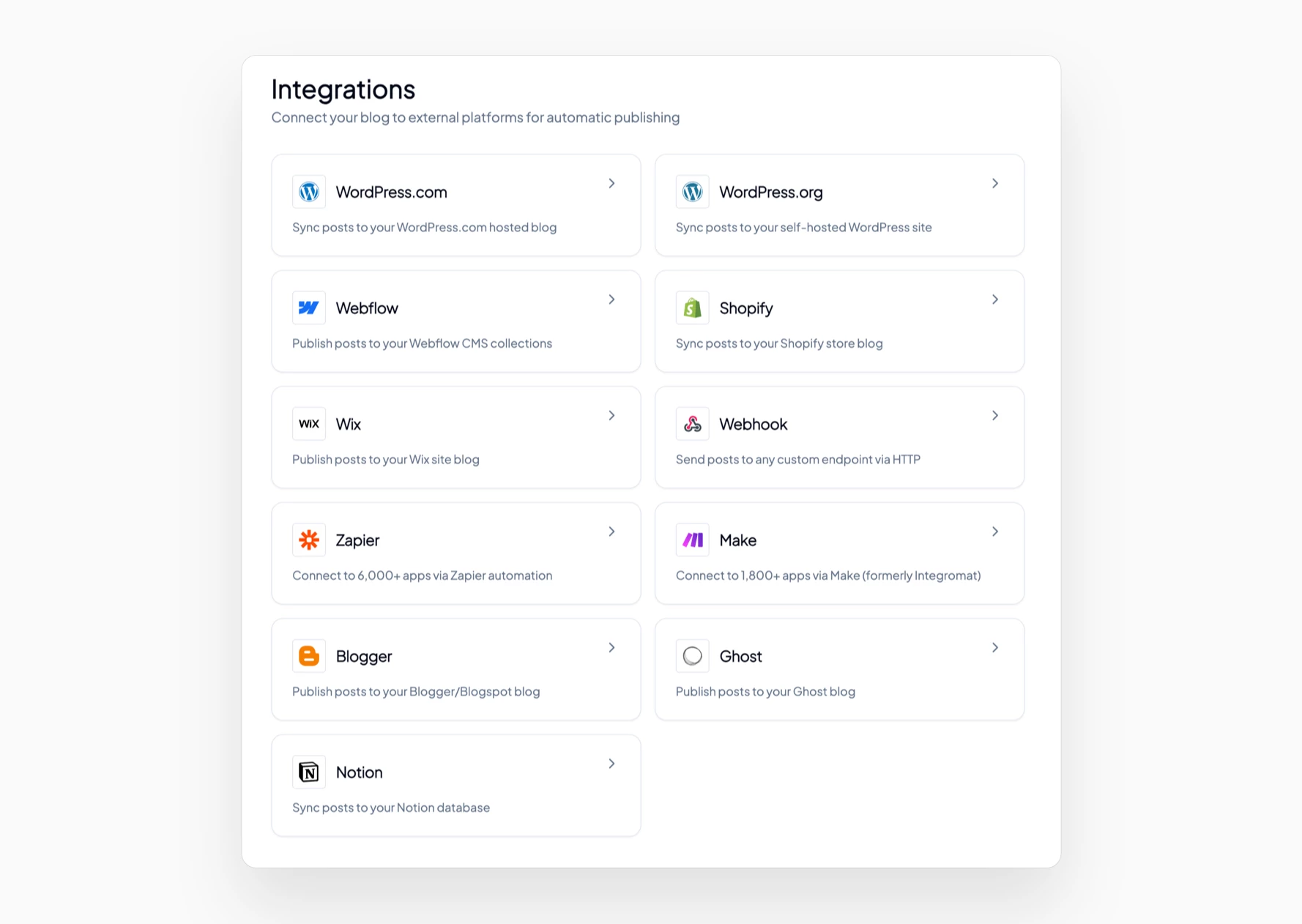
Blogie connects to your existing tools and platforms, so you can publish blog posts exactly where your audience already is.
WordPress
Webflow
Shopify
Wix
Ghost
Blogger
Notion
Zapier
Make
Webhooks
Publish to one platform — or many — with a single click or automated schedule.
Distribution and Newsletters: Notify Subscribers Automatically
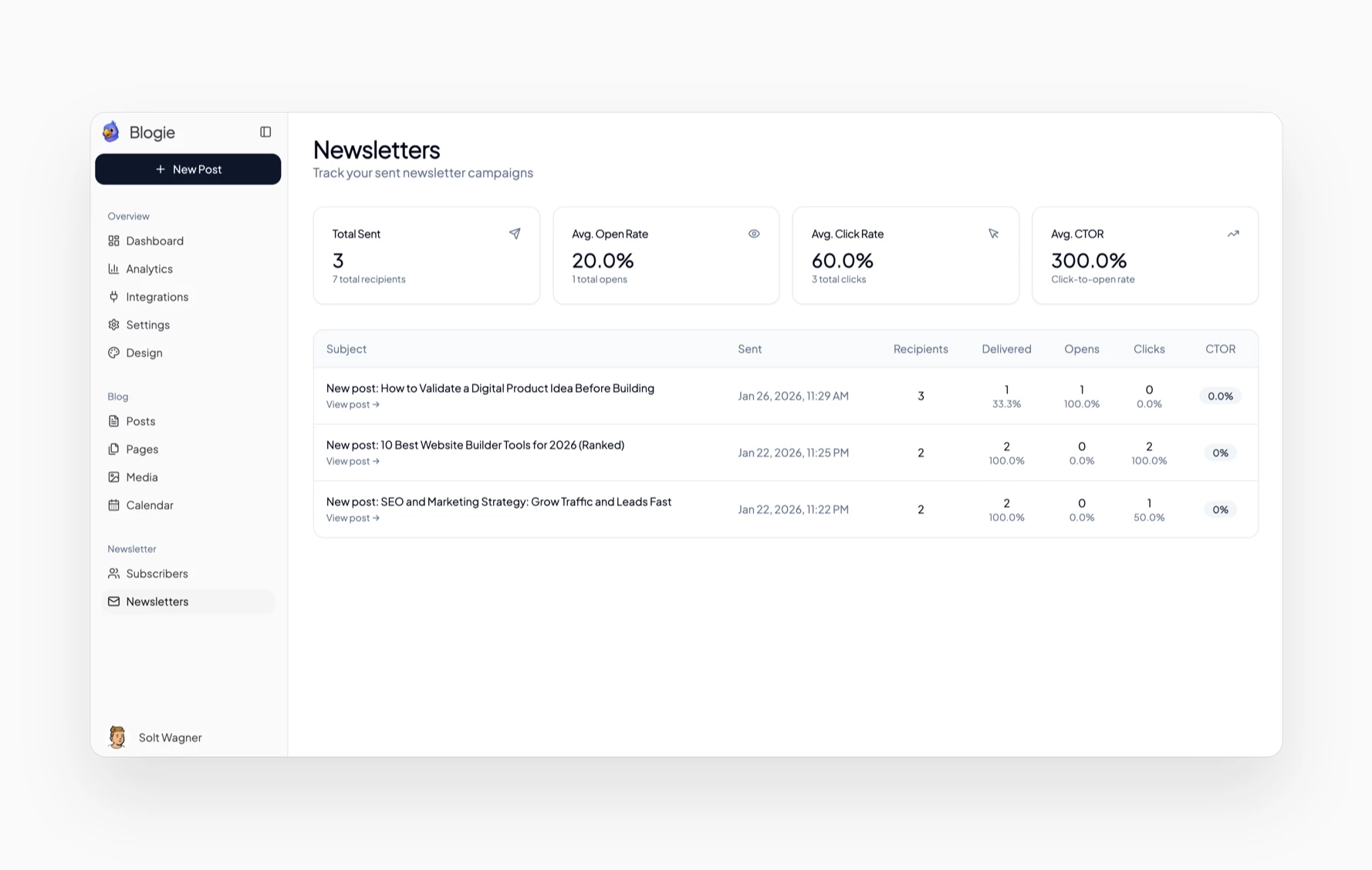
Writing and publishing are only two-thirds of the system; distribution is what turns posts into traffic and subscribers. What is Blogie in distribution terms? It’s a platform approach where new posts can trigger subscriber notifications so your content gets immediate reads instead of waiting for search rankings to kick in weeks later.
Email notifications when posts go live
Automatic notifications help ensure every post has an audience on day one, which can lead to early engagement signals like clicks and time on page. The best practice is to send a short, skimmable email: headline, 2–3 bullets summarizing who it’s for, and one clear call-to-action to read. Consistency matters more than fancy design, especially for small lists.
Subscriber growth basics (opt-ins and forms)
Subscriber growth is usually driven by three placements: a header bar, an in-article form after the intro, and an exit-intent or end-of-post CTA. Blogie-style workflows work best when you treat email capture as part of the publishing checklist, not an afterthought. Over time, even a 1–3% conversion rate from readers to subscribers can compound into a meaningful owned audience.
Turning posts into consistent campaigns
A reliable newsletter cadence turns each blog post into a campaign asset you can reuse across channels. You can write one core article, then create a newsletter summary, a LinkedIn post, and a short “key takeaways” snippet, all pointing back to the canonical URL. For more background on AI-assisted blogging workflows and how writers use them end-to-end, AI Blog Writer – The Ultimate provides additional perspectives you can apply within Blogie.
Analytics: Measuring What Works (and What to Write Next)
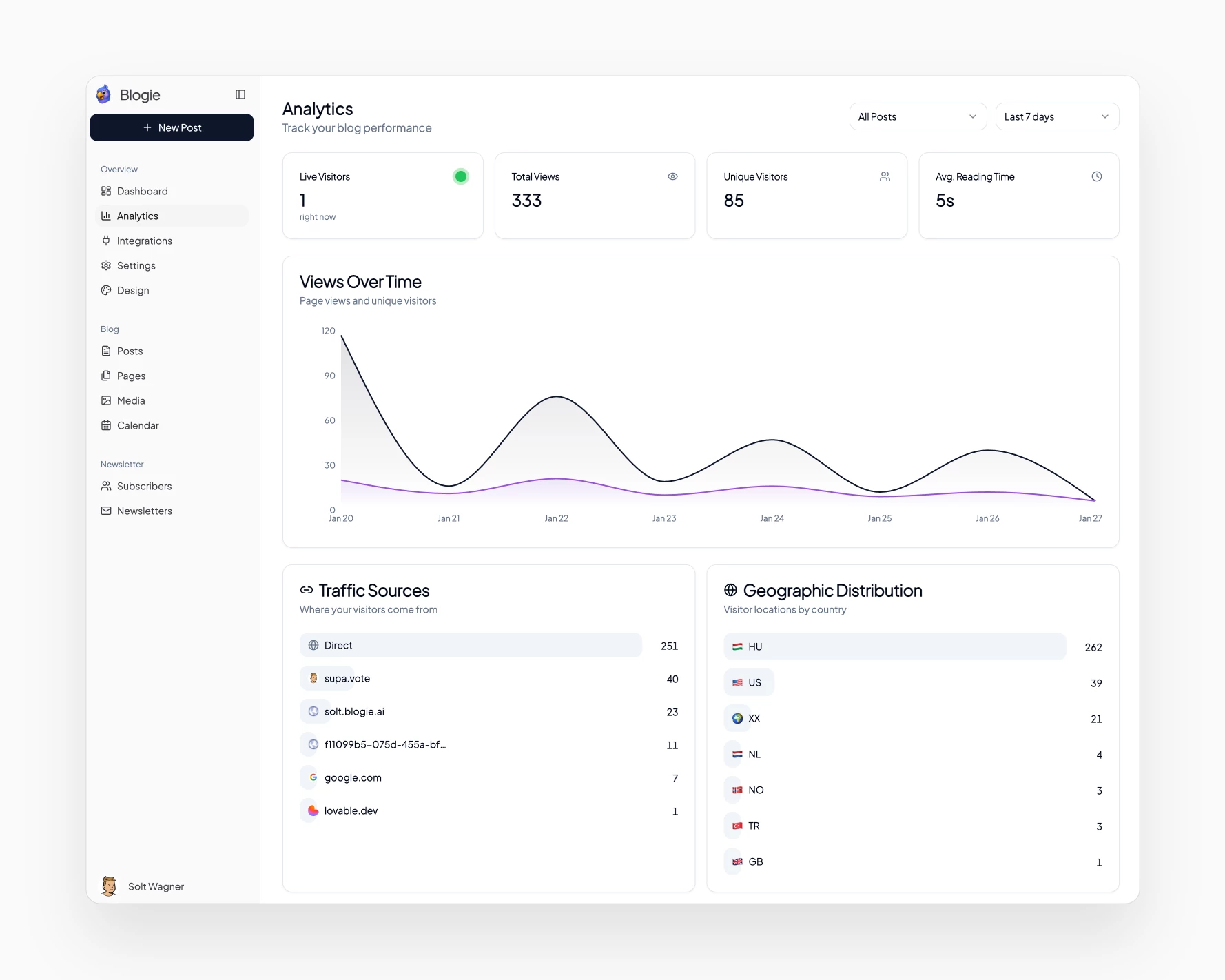
Publishing faster is only useful if you learn faster. What is Blogie from an optimization standpoint? It’s a way to connect production with performance so you can decide what to write next based on outcomes, not guesses. Even lightweight analytics can prevent months of effort spent on topics that never convert.
Key metrics to watch (traffic, clicks, subscribers)
Start with a small dashboard: pageviews/unique visitors, average engagement time, search clicks (from Search Console), and subscriber conversions per post. Then add business-aligned metrics like demo requests, affiliate clicks, or email replies if that’s your goal. The point is to track “attention” and “action,” not vanity numbers alone.
Using analytics to pick future topics
Use winning posts as signals for what your audience wants next. If one post ranks for a cluster of long-tail queries, build supporting posts that target adjacent questions and internally link them together. When a post gets newsletter clicks but little search traffic, it might be ideal for repurposing into a lead magnet or a landing page.
Simple reporting for teams and clients
If multiple stakeholders are involved, reporting has to be understandable in five minutes. A simple monthly report can include: top 10 posts by organic clicks, top 5 posts by conversions, and 3 topic recommendations based on trendlines. For beginners building confidence with AI-generated drafts and content measurement, From Zero to Hero: How to offers helpful context you can use to set expectations with a team.
Blogie vs Other Options: Writing Tools, CMSs, and Agencies
What is Blogie competing with? Not just other AI writers, but also the “stack” you already use: a CMS, SEO plugins, docs, and project management—plus the human alternative of hiring help. The best choice depends on whether your bottleneck is ideation, drafting, publishing ops, or strategic direction.
Blogie vs standalone AI writers
Standalone tools are often great at generating text, but they can leave you juggling research, formatting, publishing, and distribution elsewhere. Blogie’s advantage is a more complete AI writing and publishing workflow, where the output is designed to be published with minimal friction. If you already have a mature pipeline, a standalone writer may be enough; if you don’t, an integrated platform can save hours weekly.
Blogie vs WordPress + plugins
WordPress is flexible, but flexibility comes with setup: hosting, themes, caching, SEO plugins, and ongoing maintenance. Blogie-like platforms try to reduce those moving parts so you can focus on content instead of configuration. If your team loves WordPress’s ecosystem, you might still use it—just decide whether the writing and publishing flow is slowing you down.
Blogie vs hiring freelancers or agencies
Freelancers and agencies can deliver strong writing, but you trade speed and control for coordination and cost. Revisions, brand voice alignment, and scheduling can still take significant internal time, especially without a clean brief. A practical approach is hybrid: use Blogie to generate drafts and outlines, then have a human editor polish key posts for quality and compliance.
If you want to compare the broader landscape of AI writing tools and how they position blog generation, AI Blog Writing Tool is a useful reference point for what mainstream tools emphasize versus platform-style solutions like Blogie.
Common Mistakes to Avoid When Blogging with AI
Even the best AI blogging platform can’t protect you from sloppy process. What is Blogie good for? Speed and structure. What can still go wrong? Publishing inaccuracies, sounding generic, and missing conversion elements. Avoiding a few common mistakes will usually improve results more than generating more content.
Publishing without fact-checking or sources
AI drafts can include incorrect stats, vague claims, or outdated references that sound confident. Before you publish, verify any numbers, tool features, pricing statements, medical/legal guidance, or timeline claims. If a statement influences a buying decision, add a source or remove it—trust is harder to earn back than traffic is to gain.
Thin content and generic angles
Thin content happens when you publish what “could be true” instead of what you can explain with specificity. Add real steps, examples, constraints, templates, and decision criteria that show experience. If your post could be swapped with any competitor’s post without changing meaning, it’s too generic to win.
Ignoring internal linking and CTAs
SEO and conversion outcomes depend heavily on internal linking and calls-to-action, and AI drafts often underdo both. Add 3–6 internal links to relevant supporting posts, plus one primary CTA aligned to the post’s intent (newsletter signup, demo, free trial, or related guide). Treat this as a publish checklist item, not an optional tweak.
Real-World Scenarios: Who Should Use Blogie (and How)
What is Blogie best for in real life? Repeatable publishing with fewer blockers. The key is aligning it to a specific motion: founder-led thought leadership, a content team’s production engine, or a creator’s cross-channel system. Below are practical scenarios where Blogie’s strengths tend to show up quickly.
Founder-led marketing: consistent thought leadership
Founders often have the best insights but the least time to publish regularly. Blogie can turn rough bullets—lessons learned, customer objections, industry takes—into structured posts that still sound like the founder after edits. A good workflow is: founder provides voice notes or bullets, Blogie drafts, then the founder does a 20-minute review for accuracy and tone.
Content marketing teams: scale without losing quality
Teams can use Blogie to standardize briefs, outlines, and first drafts so editors spend time improving ideas rather than fixing structure. This can reduce the variance between writers and help new team members ramp faster. Pair the tool with a checklist (intent, examples, internal links, CTA, metadata) so every post meets the same bar.
Creators and affiliates: publish faster across channels
Creators and affiliates benefit from speed because content volume and topical coverage often drive revenue. Blogie helps produce comparison posts, “how-to” tutorials, and roundups, then supports the workflow to publish blog to multiple platforms by repurposing the core piece. The key affiliate discipline is transparency: disclose relationships, verify claims, and prioritize reader value over hype.
Getting Started: Launch a Blog in Minutes (Free Subdomain or Custom Domain)
What is Blogie like for setup? The best platforms remove the friction that usually delays publishing: hosting choices, theme setup, DNS confusion, and plugin overload. Whether you want a fast start on a subdomain or a branded property on your own domain, the goal is to begin publishing quickly and refine later.
Starting instantly on a blogie.ai subdomain
A subdomain option is ideal when you want to test momentum before committing to a full site build. You can validate topics, see which posts get clicks, and begin collecting subscribers without touching DNS settings. Once you’ve proven consistency, you can decide whether to migrate or connect a custom domain for branding.
Connecting a custom domain without technical setup
Custom domains matter when you want brand trust, cleaner link sharing, and long-term SEO equity. The simplest path is a guided domain connection flow with clear DNS records and verification steps. If you’re not technical, assign this once, document it, and then focus on content—domain work should be a one-time task, not a recurring headache.
First-week plan: 3 posts + one newsletter
In your first week, aim for three posts in one tight cluster rather than three unrelated topics. For example: one “what is” explainer, one “how to” guide, and one comparison post, all internally linked. Then send one newsletter summarizing the best post and inviting replies; those replies become future topics and improve your brand voice alignment.
FAQ: Blogie, AI Content, SEO, and Publishing
This FAQ clarifies the most common practical questions people ask when evaluating what is Blogie and whether it fits their content process. The short version: AI can accelerate drafts and workflows, but the best results still come from human review, accurate claims, and a strategy that connects content to outcomes.
Is AI-generated content allowed by Google?
Google’s guidance focuses on content quality and usefulness rather than banning AI outright. If the post is accurate, helpful, and written for people (not just to manipulate rankings), it can perform well. Treat AI as a drafting assistant and apply editorial standards—especially for sensitive topics and factual claims.
Can I edit everything before publishing?
Yes—editing is where you turn a fast draft into a brand asset. Review the structure, add examples that reflect real experience, and remove anything uncertain or overly broad. A good rule is to ensure every section answers a reader question clearly and includes at least one specific takeaway or action.
How do I keep brand voice consistent?
Create a short voice guide: preferred tone, words to avoid, formatting rules, and example paragraphs that match your style. Then reuse the same inputs each time—audience, intent, and “voice notes”—so the AI draft starts closer to your target. Consistency usually comes from process, not from a single perfect prompt.
Can Blogie replace my CMS?
Depending on your needs, it may reduce how much you rely on a traditional CMS for blogging, especially if you want an integrated AI writing and publishing workflow. If you require complex site features—membership, advanced ecommerce, heavy custom design—you may keep a dedicated CMS and use Blogie primarily as your SEO content writing tool and publishing assistant. The best choice is the one that keeps publishing consistent without adding maintenance overhead.
What is Blogie ultimately for? Turning a slow, fragmented content process into a repeatable system: research → draft → edit → publish → distribute → measure. If you commit to that loop weekly, Blogie can help you ship more posts, learn faster from performance, and build an audience that compounds over time.
This article was created using Blogie.
This article was created using Blogie.